PS2 Web Recomp
Game compatibility & local setup guide
PS2 Web Recomp brings PlayStation 2 games to the browser through static recompilation.
Explore reported game compatibility and learn how to build it locally.
GOOD TIMES
AGAIN!▟▙
▜▛
OVER.
25¢
NEW
RULES.★ HY8BIT ★
What is PS2 Web Recomp?
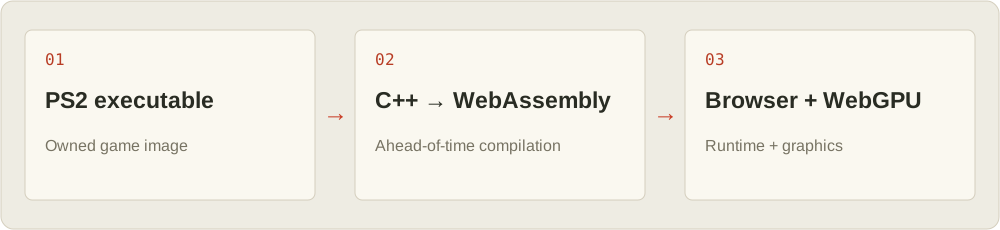
PS2 Web Recomp translates a game's Emotion Engine code into C++ ahead of time, then compiles it to WebAssembly. A browser runtime implements the remaining console systems, while WebGPU handles graphics. This is an experimental porting workflow, not a universal PS2 emulator or a ready-to-play game library.
HY8BIT follows project progress and getting-started paths, connecting retro game fans with Web technology explorers.
Project facts at a glance
Information is based on the author’s reports, not independent testing by HY8BIT.
| Topic | Verified information | Source |
|---|---|---|
| Reported progress | The author reports Gran Turismo 4 reaching races and God of War II reaching combat. | Upstream README ↗ |
| Game data | No game data is distributed. Bring a disc image of a game you own and build it locally. | Upstream README ↗ |
| Runtime technology | The main CPU code is statically recompiled to WebAssembly, with graphics rendered through WebGPU. | Upstream README ↗ |
From PS2 code to WebAssembly
The build tools convert the game's executable before you launch it. WebAssembly runs the recompiled code; the runtime handles the console services needed by the game. You need a supported browser and a successful build for that title.
Reported PS2 game compatibility
The PS2 Web Recomp author reports Gran Turismo 4 reaching races and God of War II reaching combat. These examples do not establish compatibility with every PS2 game. Results depend on your hardware, game version and build; HY8BIT has not independently tested them.
Gran Turismo 4
The real driving simulator
● Races reported workingGod of War II
Action-adventure classic
● Combat reported workingNo games found. Try another keyword.
Build PS2 Web Recomp locally
Start with a disc image of a game you own, install the dependencies listed upstream, and follow the project's current porting instructions. A working build is required before the game can run in your browser; this page does not host game files or an online player.
Prepare your game and setup
Check WebGPU support and the official build prerequisites before starting. Keep your game image and generated files on your own machine.
Get the project
git clone https://github.com/snuri00/ps2-web-recomp.gitFollow the porting guide
Follow “Port a game of your own” in the repository for current conversion, compilation and local launch steps.
Open the full build guide ↗PS2 Web Recomp setup checklist
Prepare the build environment before spending time on a game conversion. The upstream prerequisites include Git, CMake, Ninja, a C++20 compiler and Python 3; compressed inputs may need an additional archive tool. Check the current project documentation for platform-specific instructions instead of assuming that a successful installation on another computer proves your environment is ready.
Keep the repository, game image and generated output in clearly named locations. Use a short project identifier that you can recognize in commands and logs. Write down the tool versions you started with, and avoid changing the compiler or browser halfway through a test. If something fails, a stable baseline makes the next comparison much more useful.
Local build workflow and commands
After cloning the repository, run the following example from its directory. Replace the quoted game-image filename with your own local file. The identifier mygame is an example, not a downloadable game. Keep the same identifier when starting the local server so its paths point to the output you just generated.
cd ps2-web-recomp
scripts/port.sh mygame "My Game.iso"
python3 scripts/serve.py build/web-mygame games/mygame/disc.iso
Treat build errors and browser errors as separate stages. If a compiler command exits unsuccessfully, save its first meaningful error before opening the browser. A page cannot repair missing build output. If the build succeeds, use the local server and address shown by the tooling rather than double-clicking an HTML file or mixing files from different runs.
If you use an existing Emscripten installation, confirm that the terminal running the build has its environment activated. A second terminal may not inherit the same PATH configuration. Record the SDK version alongside the project revision before making changes, so you can tell whether a different result follows a source change or a toolchain change.
Troubleshooting a PS2 browser build
Check browser capabilities on the machine that will actually run the game. WebGPU availability depends on the browser, operating system, graphics hardware and driver configuration. A browser logo alone is not a reliable compatibility test. Use the browser’s graphics diagnostics and the page’s own error message to determine whether an adapter is available before treating poor rendering as a game-specific failure.
Threaded browser applications also depend on their serving environment. Inspect crossOriginIsolated in the developer console when investigating a SharedArrayBuffer or threading error. Cross-origin isolation is controlled by response headers and related document policies; it is not enabled just by placing a file on an HTTPS website. Follow the project’s serving instructions, and distinguish a server configuration issue from a compilation problem.
When a page opens but stops, capture the earliest console error and the network request associated with it. Check whether the requested asset exists at that exact path and whether its response is a file or an HTML error page. Retry one change at a time. A missing file, an unavailable graphics adapter and an unsupported game feature require different investigations.
Keep browser saves separate from build files
The upstream player provides memory-card import and export. Make a backup before clearing site data, switching browser profiles or experimenting with a different local address. Keep exported cards in a clearly dated folder, separate from generated build files. Do not assume a rebuild or a copied web directory also copies the browser’s stored progress.
When checking a save, note which game and local address produced it. Test a restore with a spare copy rather than replacing your only backup. This makes it easier to distinguish a save-handling issue from a game that has not reached a working state yet.
What a useful compatibility report should include
A title screen is a milestone, not proof that an entire game is playable. Record the stages you actually reached: boot, menus, a controllable scene, audio playback, a transition and a save or load attempt. Mark anything you did not test as unknown. Separate what you observed from what you expect to work, and avoid turning a short successful session into a full-compatibility claim.
Include the game edition and region, project revision, operating system, browser version, graphics device, build command and a short reproduction sequence. If you measure performance, state the scene, resolution and measurement method. Compare repeat runs under the same conditions before attributing a difference to the project. These notes help another reader reproduce the result and keep PS2 Web Recomp compatibility discussions more useful than an unsupported works-or-does-not-work label.
HY8BIT’s current game entries summarize the author’s reports. The checklist above is editorial guidance for your own testing, not a claim that HY8BIT has completed those tests. Keep personal results distinct from upstream reports, and link the exact issue or revision when sharing a technical finding.
Before your first build
Can I play PS2 Web Recomp games on this page?+
This page introduces the project and links to its build guide. It does not host games or an online runtime. Follow the official guide to build locally.
Which PS2 games are supported?+
The author reports Gran Turismo 4 reaching races and God of War II reaching combat. Other titles need their own build and testing; these reports do not establish universal compatibility.
Do I need to download an emulator?+
Build output runs in a browser with the required features. The main CPU uses static recompilation; the runtime implements the other hardware functions.
Is HY8BIT an official project?+
HY8BIT is an independent gaming and technology guide, with no official affiliation to Sony or the upstream project. See the original repository for contributions and licensing.