COMPATIBILITY
Which PS5 games run on Xbox?
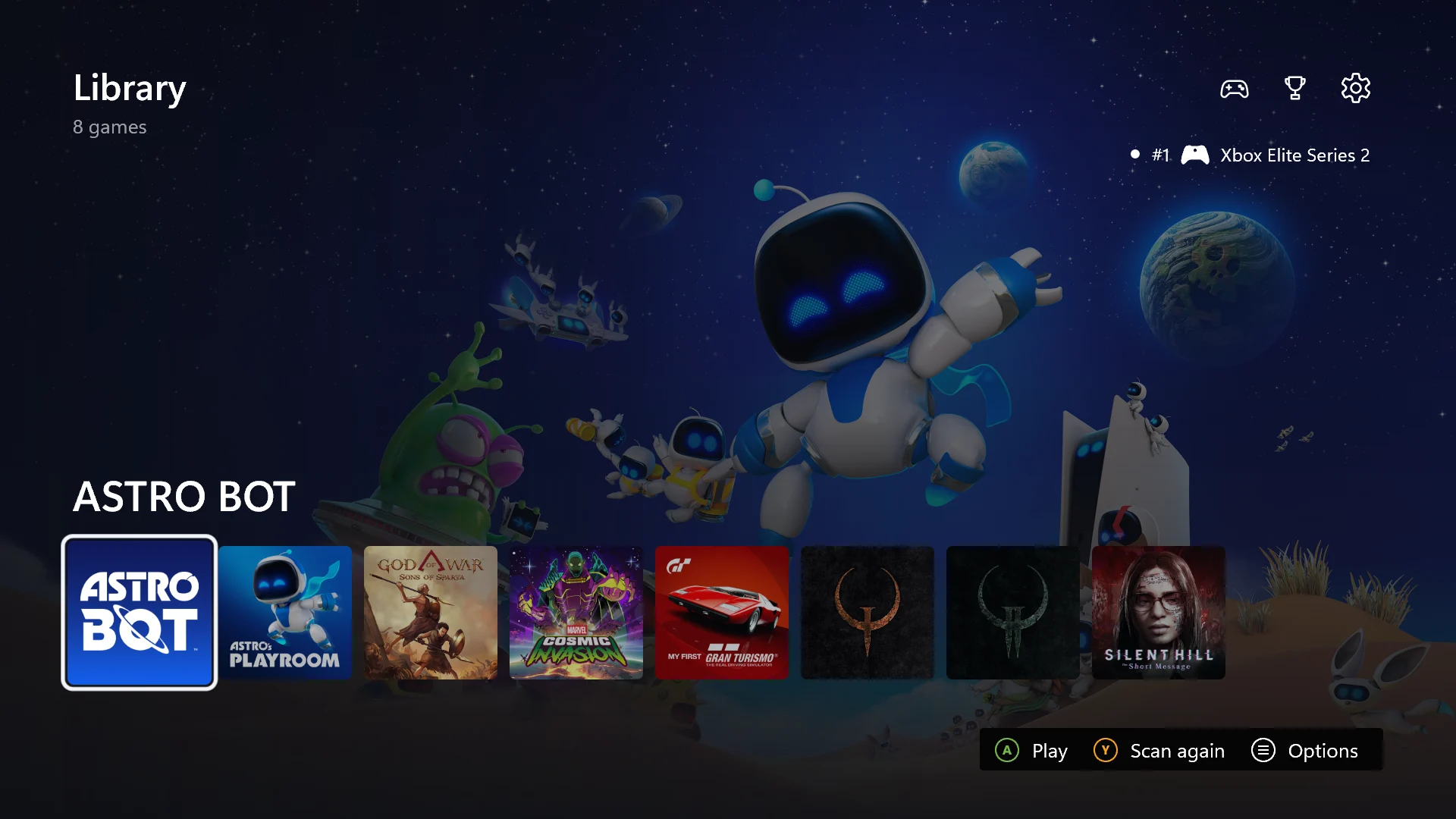
Quake II has an Xbox Series X gameplay demo, and Astro’s Playroom has a controller demo. Other titles appear in an early game library. These demonstrations cover specific builds and scenes; full-game compatibility remains unverified.
| PS5 game | Xbox evidence | Game status | Video |
|---|---|---|---|
| Quake II | Gameplay demo | Gameplay shown on Xbox Series X. Full-game completion is unverified. | Watch demo |
| GEX Trilogy | Library listing | Shown in the early launcher; the listing does not confirm playability. | Watch demo |
| Hellboy: Web of Wyrd | Library listing | Present in the early game library. Individual gameplay status is unconfirmed. | Watch demo |
| Marvel Cosmic Invasion | Library listing | Listed in the early demonstration. Full-game compatibility is unverified. | Watch demo |
| Astro’s Playroom | Controller demo | Xbox controller mapping demonstrated. Astro’s Playroom is a separate game from Astro Bot. | Watch demo |
No matches. Search another game or clear the field.
Earlier demonstrations do not establish compatibility for every later release. Use Xbox reports with a console model and build number; upstream PC results do not establish Xbox playability. Original Xbox demonstration ↗
DOWNLOAD & SETUP
Download PS5X and set up Developer Mode
Prepare an Xbox Series X or Series S with Developer Mode activated, a Windows PC, an NTFS USB drive and your own legally obtained game files. Xbox One is not supported.
Xbox prerelease · 1.1.26291.1739
Version xbox-1.1.26291.1739 was published October 19, 2026 at 01:39 (UTC+8; October 18 UTC). Download the Xbox ZIP from GitHub’s Assets section; it contains the .msix app and Dependencies folder. The Source code archives are for source builds.
Download Xbox release ↗Before you activate Developer Mode
Is PS5X free?
KytyPS5 is free and open source. Microsoft developer-account registration is separate: its new individual onboarding waives registration fees, while Xbox and direct Partner Center entry points use the legacy flow. Review the terms shown for your account before paying.
Microsoft registration routes and feesCan I still play my normal Xbox games?
Retail games run in Retail Mode. PS5X runs in Developer Mode. Switching between them restarts the console; you do not run both environments at once.
Microsoft mode-switching instructions
- 01
Activate Xbox Developer Mode
Complete Microsoft app-developer registration and activate the console using the code from Xbox Dev Mode. Select Switch and restart. In Dev Home, find the Device Portal address; the PC and Xbox must be able to reach each other over the network.
Microsoft's Xbox activation guide - 02
Unzip the Xbox release on your PC
Download the Xbox ZIP from Cosmo/KytyPS5 and extract it. Keep the .msix app and Dependencies folder together.
Download the Xbox package - 03
Install through Xbox Device Portal
Choose Add, select the .msix and include both dependency packages. After installation, set the app's type to Game in Dev Home.
- 04
Prepare your USB game folder
Use NTFS. On the PC, grant the selected game folder read access for ALL APPLICATION PACKAGES as documented by the project. Choose Media when connecting the drive to Xbox.
Game-folder permissionsUse a scan-ready game folder
A game folder must contain eboot.bin. The launcher searches up to two levels below the selected folder and also reads .zar archives. Add the parent folder in Settings → Game folders, then press Y to scan.
PS5Games/
  ExampleGame/
    eboot.bin
    sce_sys/
      param.json
  AnotherGame.zar
Allow the game folder to be read
On the Windows PC, replace E: with the USB drive letter and run this in PowerShell for your dedicated game folder. You can also add ALL APPLICATION PACKAGES with Read & execute through the folder’s Security properties.
icacls "E:\PS5Games" /grant "*S-1-15-2-1:(OI)(CI)RX"This grants all UWP apps read access to that folder and its children. For access limited to this app, use its package SID as described in the project documentation.
After scanning, the game should appear in the library. If it does not, check the folder path, eboot.bin and permissions before changing graphics settings.
- 05
Add the folder and test one title
Add the USB game folder in the app’s settings, then press Y to rescan. Launch a game and check graphics, audio, controls and saves. Keep the console model and build number with any error report.
Use the Xbox app documentation for USB permissions, controller shortcuts and package updates. Xbox app documentation ↗
CONTROLS & SAVES
Controls, saves and returning to normal Xbox games
The controller guide maps Xbox inputs to PS5 functions. These shortcuts cover the controls that are easy to miss on a standard Xbox pad.
| Xbox input | Function |
|---|---|
| Menu | PS5 Options button |
| Hold View + move or click the left stick | Touchpad position or touchpad press |
| Hold View + move the right stick | Tilt / motion input |
| View + Menu | Open the emulator’s in-game menu |
| View + Menu + LT + RT | Show or hide the performance overlay |
While View is held, the sticks stop sending normal movement to the game. Release View to resume ordinary stick control.
Where are saves stored, and how do I back them up?
Choose a writable USB folder under Settings → User Data Path for saves, patches and trophies. A read-only location is not enough: if it cannot be written, the game falls back to the app’s own folder. Close the game and copy your chosen user-data folder before replacing or removing files.
User-data location and permissionsHow do I update the Xbox app?
Install the newer Xbox package over the existing app through Device Portal. The Xbox release notes say this keeps app data. Keep a separate backup of your user-data folder, and use Xbox release packages rather than instructions for the desktop updater.
Xbox update and installation notesHow do I go back to Retail Mode?
In Dev Home, open Quick Actions → Leave Dev Mode. The console restarts into Retail Mode for normal Xbox games. To return, open Xbox Dev Mode and select Switch and restart.
Switch between Retail and Developer ModePERFORMANCE & LIMITS
What performance should you expect?
Performance varies by game, scene and build. Reaching a menu or playing one scene does not guarantee a stable full playthrough. Check Xbox footage for the same game and console model before installing.
PS5X, PC emulation or an Xbox edition?
| Option | Runs on | Before you play |
|---|---|---|
| PS5X / KytyPS5 Xbox | Xbox Developer Mode | Check game reports for your Xbox model and build. |
| Upstream KytyPS5 | Primarily Windows / Linux | Check PC hardware, renderer and game reports. |
| Native Xbox edition | Regular Xbox environment | Use the publisher’s Xbox edition of the game. |
The Xbox port uses its own Direct3D 12 renderer. Some unsupported graphics operations are skipped, which can leave missing effects or incorrect visuals even when a game runs. PC settings and performance figures may not carry over. Check the Xbox release notes and known limits for rendering issues.
To examine a game yourself, enable the performance overlay and compare the same scene on the same console and build. Check sound, input response, missing graphics and saving as well as FPS. Reopen the game after changing settings that apply at launch.
Xbox changes and known limits ↗
Should you use PS5X or the native Xbox version?
For regular play, use a publisher’s native Xbox edition when available. Quake II already has an official Xbox release. PS5X is useful for experimenting with the PS5 build on Xbox hardware; a native Xbox version, a PS5X run and a stream from another device are different ways to play.
Fix common setup problems
The app will not install
Select the Xbox .msix and both packages in Dependencies. If installation fails, save the exact Device Portal error message before trying again.
My games do not appear
Check the folder path, USB Media mode and read permissions, then press Y to rescan. A visible cover confirms the game was found, not that it can start.
The game stops or renders incorrectly
Keep the console model, app and game versions, and the last working scene. The app writes kyty-uwp.txt and kyty-emulator.txt under LocalState. Include those logs when reporting a crash, and compare the symptom with the Xbox known limits.
GOOD TO KNOW
PS5 on Xbox: common questions
Are PS5 games really running on Xbox hardware?
Yes. PS5X is Cosmo’s experimental Xbox port of KytyPS5. It loads PS5 game files locally on Xbox Series X in Developer Mode. This is a community compatibility project, rather than an official Xbox edition or a video stream from a PS5. Support depends on the game and build.
Is there a public PS5X download?
Yes. Cosmo/KytyPS5 publishes Xbox prereleases on GitHub. Version xbox-1.1.26291.1739 was released October 19, 2026 at 01:39 UTC+8 (October 18 UTC).
Does it work on Xbox Series S or Xbox One?
The Xbox package targets Series X|S in Developer Mode. Xbox One is not supported. Series X gameplay footage does not establish Series S performance.
Can I insert a PS5 disc and play?
No. PS5X loads prepared game folders or .zar archives. It does not provide PS5 disc playback; you need your own legally obtained game files.
Can it play every PS5 exclusive?
Full-library support is not established. A PC compatibility report or an Xbox launcher cover does not confirm that a game is playable on Xbox.
Does an Xbox controller work?
Yes. Xbox controllers are supported, with button combinations for touchpad and motion inputs. Open the app’s controller guide for the mappings.
Is this the same as AnyPS5?
No. PS5X is Cosmo’s Xbox port of KytyPS5. AnyPS5 is a separate project with its own desktop workflow.
Is this an official PlayStation feature on Xbox?
No. KytyPS5 is a community project and states that it is not affiliated with Sony Interactive Entertainment or PlayStation.
REFERENCES
Downloads, documentation and gameplay videos
Get Xbox packages from the project’s release page. Use the app documentation for installation and the original videos to see the demonstrated games.